


















.svg)










.svg)





















.png)

.jpeg)
While coming up with solutions for complex problems, I’m always coming across situations where the outcome can vary based on multiple factors and conditions. At RapDev, we like to explore every possible series of solutions to better address our customers needs but it does become difficult when we take into account all of the decisions and paths that a process can follow.
I do a lot of work in Flow Designer, and I’d always end up using multiple nested If, Else If, and Else flow logic steps to reach a solution. Creating and maintaining all of these steps and each of their conditions added another layer of difficulty. At the end, it always looked like one big unorganized mess that was hard to manage.
I’ve found that using Decision Tables instead can be a practical alternative in cases like this. They can be called from any Flow or Subflow using the “Make A Decision” flow logic statement. Decision tables provide an organized and readable format while also serving as a single point to view and modify decisions. Using this instead of those nested If, If Else, Else statements to make complex decisions in turn provides a more manageable, organized , and extendible Flow and decision making process.

Let’s start with the basics. A Decision Table contains 4 components:
- Decision table: Record that represents your decision and contains all inputs, decisions, and answers
- Decision inputs: The inputs that we’ll be evaluating to obtain the answer (can include a variety of field types)
- Decision records: Each record will represent a decision that is made based on your inputs using conditions and filters. Then, you can select the answer record to this decision
- Answer records: Answer records represent answers that are reached using different decisions. When creating your decision table, you must define the table in which your answers will come from
Example:
Your Service Catalog consists of many different types of software and hardware for a user to request. The approvals required for each item is based on several factors, such as the item’s price, type (hardware or software), and quantity. Based on these values, a RITM approval can require either Low, Medium, or High level approvals.
Creating a decision table
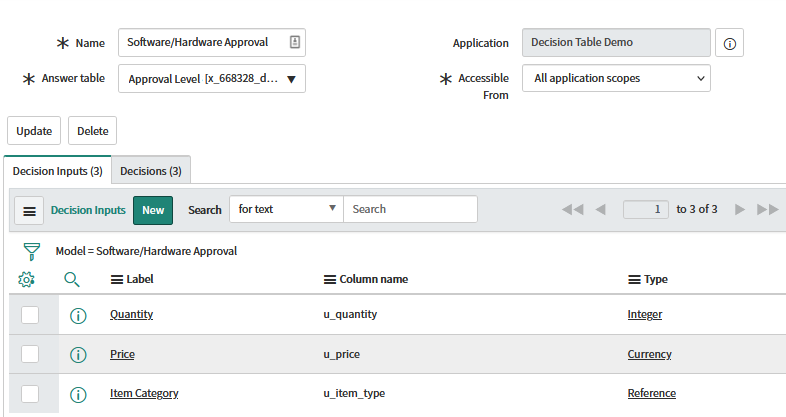
To create a decision table in ServiceNow, navigate to System Definition > Decision Tables in the filter navigator and create a new record. For this example, I’ll use a custom table called “Approval Level” for my answer table.
I also created the inputs for the 3 values I’ll need to evaluate - Quantity, Price, and Item Category.
Now on to the decisions
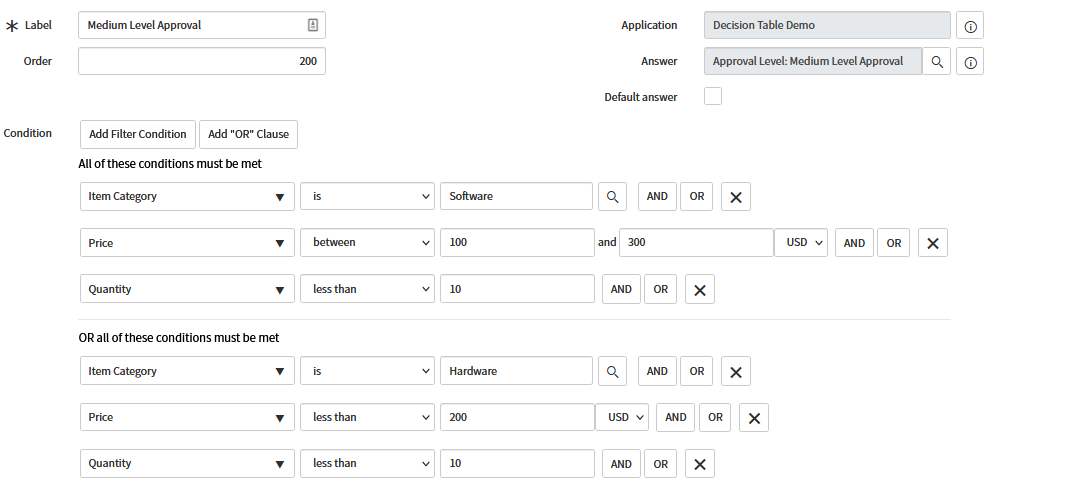
I made a decision record for each level of approval (Low, Medium, and High). For each record, I added conditions and set the answer to the corresponding record in the Approval Level answer table. In order for a decision to be made, all input values must match the conditions set. You can set the order the decisions are evaluated as well as specify a decision as the default answer for a case where none of the decision records match your inputs.
Example - Medium Level Approval Decision
Using your decision table in Flow Designer
Now that we successfully created our decision table and all its components, we can utilize the answers of those decisions in Flow Designer.
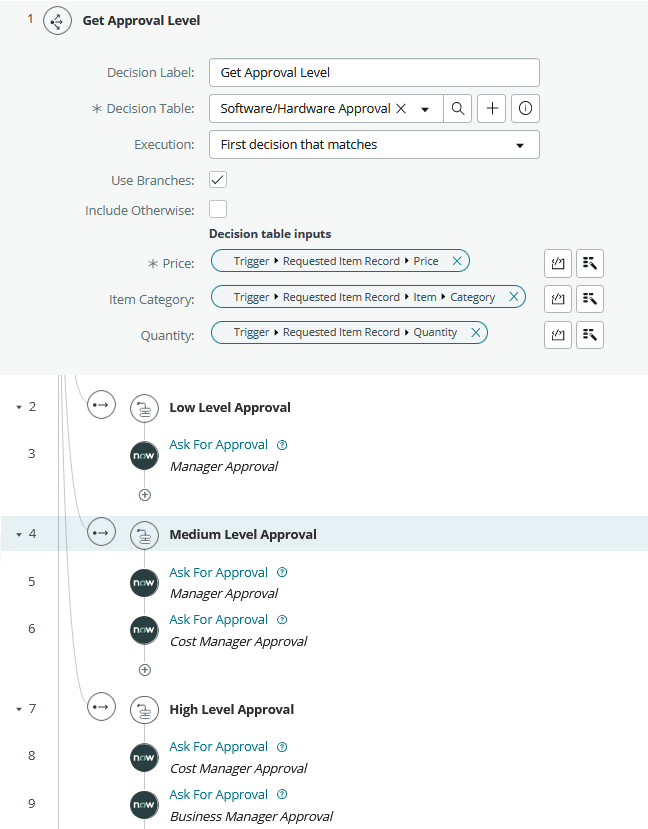
Under Flow Logic, select “Make a decision” and select the decision table you want to use. Select “Use Branches” if you want to perform actions based off each individual answer. Otherwise, you can utilize the data pill output from that decision later in your flow. Add in your inputs