



















.svg)










.svg)


















.png)


There are few better feelings in the ServiceNow world than a freshly cloned sub production instance. All of your organization’s latest business services, change requests, and assets all in dev, ready to be referenced as soon as you begin development for the next big project. Not only does it make life so much easier, but it also helps speed production along for everyone involved. If you haven’t experienced this organized and streamlined process of cloning production instances, here’s how.
Let’s say, you kick off a cloud discovery but get no results. First step to take when debugging is to check the connections and credentials records. The example below shows the necessary connection record in the list view but there is no preview available and the record cannot be opened.
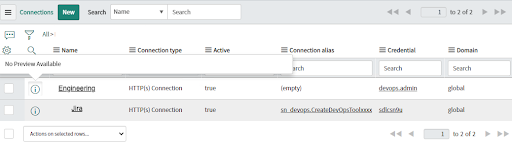
This is the primary indication of orphaned records. An orphaned record will be visible in the list view but will be unable to be opened or selected in a reference field.
The other Indication of an orphaned record can be spotted within a Flow Designer execution which includes a REST step. The image below shows a REST step inside an action that was executed and returned a 403 error. 403 is an authentication error, looking at the flow execution you can notice that no credential record was even selected. Therefore no username/password or API key was ever used during the REST message.
.png)
The following script can be run to identify if your instance is affected by orphaned credentials. Run the script in background, if the output is greater than 0, then orphaned credentials have been identified.
There are two options available to you when dealing with orphaned credentials. You can open a case for ServiceNow support and one of their engineers will clean up the respective tables for you or you can clean up the records yourself by running the following script.
Once the tables are cleaned up you can export and import your connections and credentials for another instance.
How do I avoid this in the future you ask? Make sure your production instance has the following clone preservations rules set for all of the respective tables.
Manually add child tables in the Preserve configuration of the source instance.
- jdbc_connection
- http_connection
- orch_jms_ds
- OR any other table which EXTENDS to sys_connection
Happy cloning!