




















.svg)











.svg)





















.png)


What is Vector?
Vector is a data pipeline tool created and owned by Datadog, and it can be used to collect, transform, and route data into Datadog. The power of Vector lies in its ability to transform data sent from the Datadog agent. In this blog, I’m going to provide an overview of how Vector works and how you can leverage its capabilities to enhance logs and metrics coming into your Datadog environment.
How Does Vector Work?
As a data pipeline tool, Vector is used to collect data from a source, transform that data, and then forward the data to another source. Keeping this in mind, the three primary components of Vector are Sources, Transforms, and Sinks. Sources are used to ingest data into Vector. There are multiple types of sources, from a file to a Datadog agent. Transforms precisely do what the name implies: they change data from a source. Finally, Sinks are used to send data onward to its target. Similar to sinks, there are multiple different types of sources. With these three components, we can see how Vector consists of three separate yet equally important slices.
Using Vector with the Datadog Agent
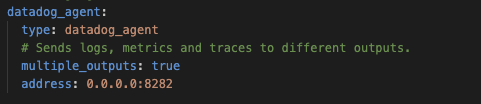
Now that we know how Vector works, we can discuss how to use it to enhance your Datadog logs and metrics. The answer to how we do this is sources and transforms. In Vector, there is a source called ‘Datadog Agent.’ Using the Datadog agent source, we make Vector the middleman in all data flowing from that Datadog agent into Vector. We can also use an option called ‘multiple_outputs’ to split log and metric and trace data into their sub-sources. Allowing us to easily manage one aspect of the information collected by the agent.
Using Transforms to Enhance Metrics and Logs
Now that a source collecting metrics and logs from the Datadog agent exists, we can use Transforms to enhance the data. There are many different ways to leverage transforms in Vector with Datadog metrics. I’m going to walk you through two helpful transforms.
Remap
The remap transform might have a simple name, but it's potent. Remap is powerful because it leverages the Vector Remap Language (VRL). Using this language, you can mold data from metrics and logs however you want. A typical example of remaps is replacing or removing texts from logs or turning a line of text into a key-value-based JSON format. Remap can also add simple items, such as adding tags to metrics. Below is an example of a remap removing unwanted characters from logs.
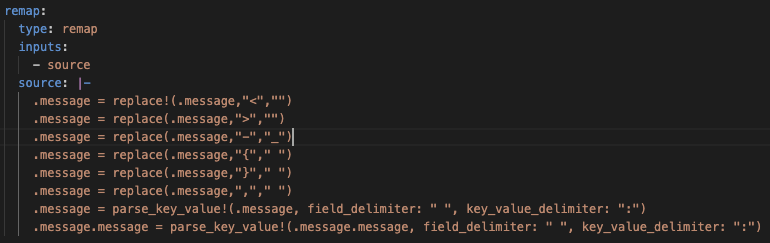
Log To Metric
The logs-to-metric transform can be used to transform logs into metrics and is a great way to get usable data from logs without having to pay ingestion costs. The best way to leverage this transform is to convert a log into a readable format with a remap transform. Then, create a new metric with associated tags. By doing this, we are creating custom metrics with tags that we control without ever having to ingest the log into Datadog.
Conclusion
The above example is just one way of leveraging Vector to enhance information collected from your Datadog agent. We will dive more deeply into Vector and best practices for using the tool in the future.
Supportive Docs
Sources, Transforms, and Sinks - https://vector.dev/docs/reference/configuration/
Remap - https://vector.dev/docs/reference/configuration/transforms/remap/
Log To Metric - https://vector.dev/docs/reference/configuration/transforms/log_to_metric/