




















Datadog

Datadog Expertise

RapDev is a Datadog Premier Partner focused on accelerating our customers’ time to value.
600
Implementations
110
US-Based Engineers
68
Datadog Certifications

Security & Managed SOC

Quickly and seamlessly implement Cloud SIEM, ASM, SCA, and Cloud Security Posture Management to power a modern DevSecOps strategy

Incident Management

Transform data into high-confidence, actionable incidents using AI-driven detection, clear ownership models, and automated remediation

Marketplace Integrations

RapDev is proud to offer more Datadog Marketplace integrations than any other partner

ServiceNow

ServiceNow Expertise

RapDev is a ServiceNow Elite partner focused on helping you drive business outcomes with the ITx suite.
4.7
CSAT Score
136
Product Line Certs.
67k
AI Agents Discovered

Agentic AI & AI Governance

Deploy and scale production-ready agentic AI to automate workflows and accelerate ServiceNow outcomes

Enterprise Architecture

Connect your technology landscape to business strategy to optimize investments, reduce risk, and accelerate modernization

ServiceNow Store

Leverage RapDev’s certified apps and AI Agents to expedite operations on the Now Platform
Blog
Company

About RapDev

RapDev is powered by a team of experienced, U.S. based engineers focused on redefining service operations through AI, automation, and modern observability.

Join the RapDev team

Our no-frills approach to collaborating is what allows us to deliver the best. Our team is growing and we’re looking for the best in the game.

Press

Latest news and announcements from RapDev

Events & Webinars

From hands-on workshops to industry-leading conferences

Resources

Back to blog

Extend Observability into Google Cloud with GCPEnhanced

Uncover Google Cloud Platform insights effortlessly with GCPEnhanced—an open-source app amplifying ServiceNow's cloud discovery

X

min read

January 25, 2024

Valdas Simanauskas

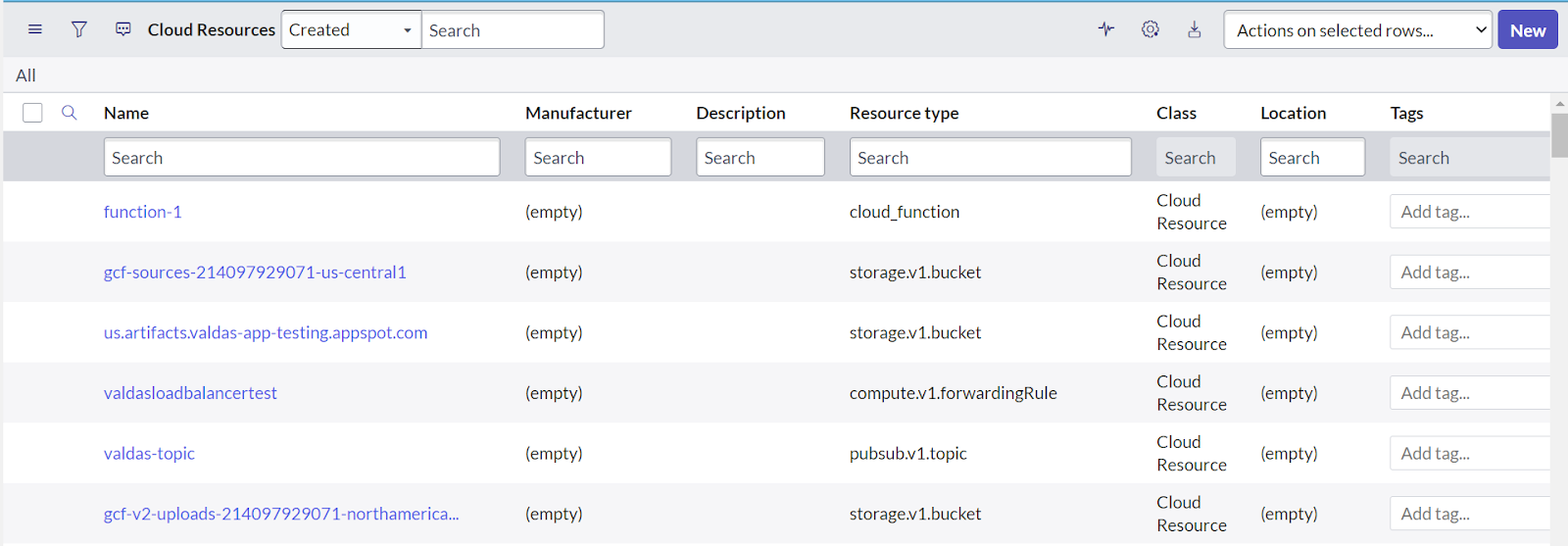
GCPEnhanced is a custom open-sourced app that allows you to expand ServiceNow’s out-of-the-box cloud discovery capabilities. The app provides extended clarity into the resources within your Google Cloud Platform, allowing for more complete Service Maps and Visibility. It enables organizations to gain better visibility into their Google platform by targeting specific resources: Storage Buckets, Load Balancers, Pub/Sub Topics, and Cloud Functions. Resources are stored in an OOTB table called Cloud Resources and categorized in a Resource Type field.

Behind the scenes, GCPEnhanced leverages the OOTB pattern - “Google Cloud Platform (GCP) - Logical Datacenters.” It extends the pattern in an extension section called “Extra GCP Resources.” This extension section calls different shared libraries, each responsible for discovering the various resources. The shared libraries work independently by making separate API calls to Google for the particular resource.
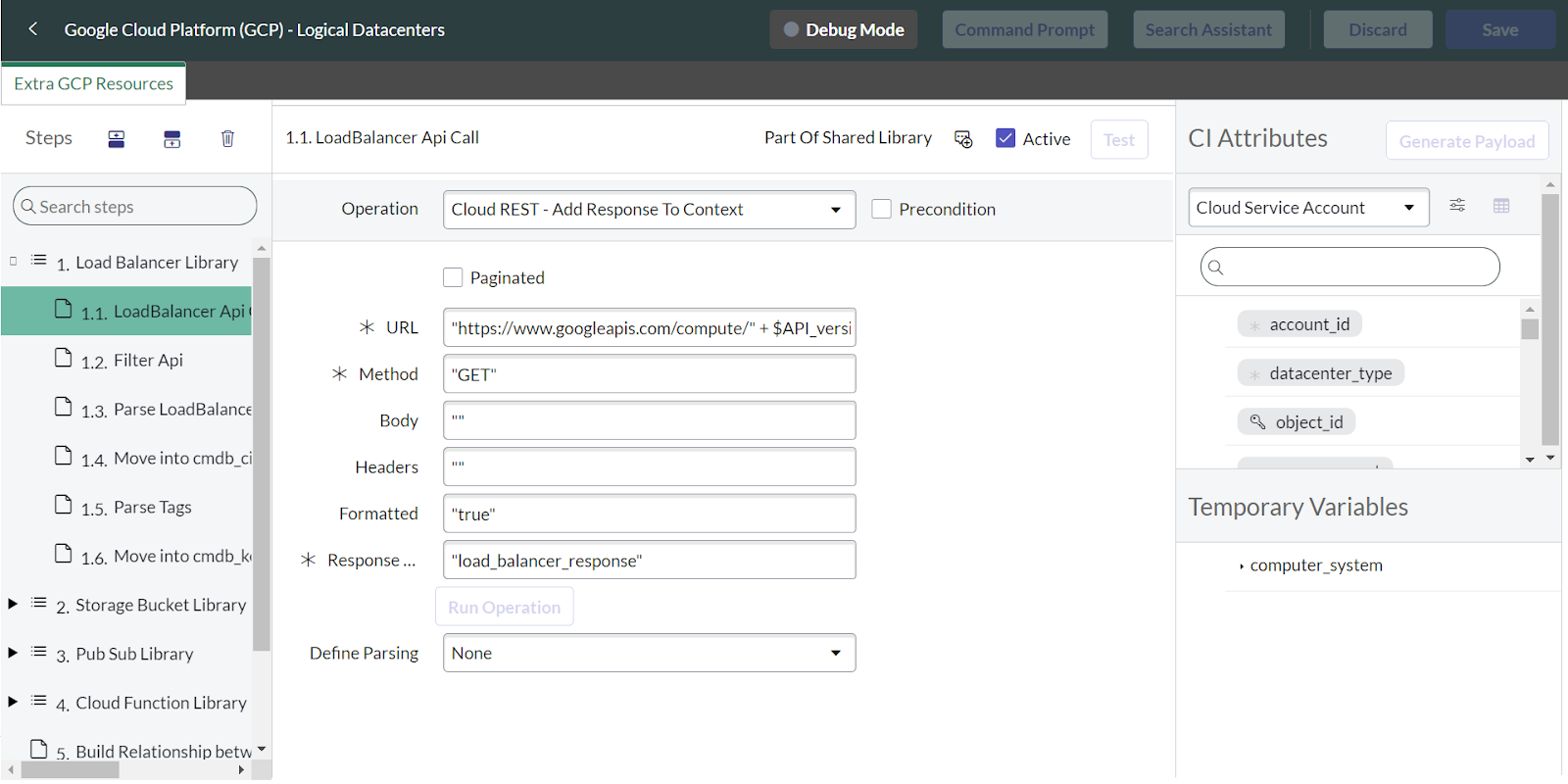


After making a successful API call, the library parses the JSON response and extracts the values into the Cloud Resource Table. Then, a custom EVAL script parses the API response again and targets any associated labels to these resources.  


var ArrayList = Packages.java.util.ArrayList;
var HashMap = Packages.java.util.HashMap;

// Create the target table
var storageBucketLabels = new ArrayList();
CTX.setAttribute('storage_buckets_labels', storageBucketLabels);

// Iterate over the response table
var response = CTX.getAttribute('storage_bucket_response');
var responseIter = response.iterator();

while (responseIter.hasNext()) {
var line = responseIter.next();
var storageBucketObj = JSON.parse(line);
for (var storageBucketIdx in storageBucketObj.items) {
var storageBucket = storageBucketObj.items[storageBucketIdx];
// Iterate over labels
if (!storageBucket.labels)
continue;

for (var key in storageBucket.labels) {
// Create new row in the target object
var storageBucketRow = new HashMap();
storageBucketRow.put('configuration_item',storageBucket.id);
storageBucketRow.put('key',key);
storageBucketRow.put('value',storageBucket.labels[key]);
storageBucketLabels.add(storageBucketRow);
}
}
}

rtrn = 'success'


For Storage Buckets, the Eval script loops through each Storage Bucket in the response and checks if it has any labels. If it does, the script creates a row in the storageBucketLabels table, which later generates tags in the cmdb_key_value table.

Each resource is then linked to a Datacenter if it has a region or a Project Folder if no region is associated with the resource. Everything the app discovers can be found in the Cloud Resources table.

Install GCPEnhanced from our Open Source Repo here!