



















.svg)










.svg)





















.png)


Discovery faces a challenge with the multitude of IPs and IP Ranges within its scope. With thousands of them distributed across various Discovery schedules, there is a concern that some subnets might be scanned redundantly from different schedules. While we are confident that this is happening, unfortunately, time constraints hinder us from conducting a detailed investigation. That means Discovery is chewing up unnecessary resources on the instance, and an untold number of those networks are getting scanned more than they should.
Wouldn’t it be nice if we could see all the overlapping ranges? Hey Discovery–show me all ranges that overlap with another range and which schedule each one is on.
Well, here at RapDev, we have an app for that. It consumes all your schedules, all the IPs and Ranges in those schedules, and spits out a handy table of overlapping IP ranges and the schedules they belong to. The Discovery admin can filter the list, dive into each schedule or range, and remediate things to remove redundancies.
The overlaps can be whole or partial. Large ranges like 10.170.10.0/16 will likely overlap several other subnets buried within various schedules. Our app will spit out a row for each subnet the larger range contains. Here’s an example.

The results show you the two schedules with an overlapping range. You can click into either the schedule or the ranges or add other schedule attributes for better filtering.
Oh, but what about individual IP addresses? Discovery schedules can have a list of IPs, not just ranges. Yes, we’ve got that covered, too. We check both IPs and IP Ranges.

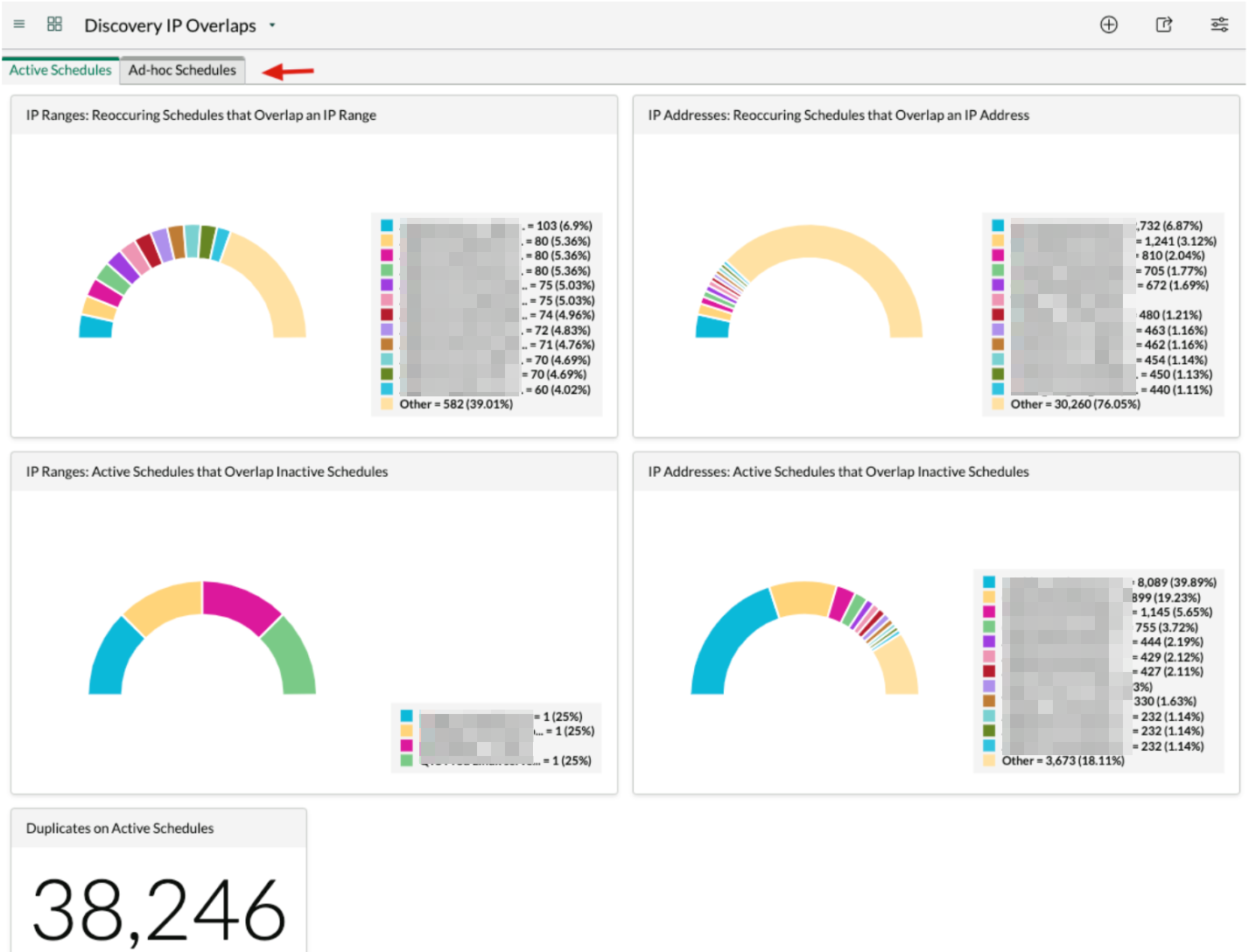
We’ve also included an IP Overlaps dashboard, which gives the Discovery admin some quick visuals and lets him drill down for further investigation.
So, write to us for some visibility into your IP Range overlaps. We’d love to make your Discovery process cleaner and more efficient.
For the Do-It-Yourself-er
If you want to build something like this, here are some suggestions.
- Collect the relevant data from tables discovery_range_item and discovery_range_item_ip into an array of objects.
- As part of each object in that array, calculate the start & end IP addresses for the range. You’ll need this to check for overlaps later. Use Google or your favorite AI tool to get the algorithm for this.
- Spin through the array of objects. For each, compare it to all the other objects in the array, looking for overlaps.
- For each overlap, create a row in your results table.
When comparing IPs, it’s best to convert the IP to a numeric value. We chose the method below.
For #3 above, make sure to compare each range only once. Think about it. As you traverse the array, you’ll compare range A to B, and later down in the array, you’ll compare range B to A. It’s the same comparison, just in reverse. Noodle on this, and you’ll find a clever way to avoid it. Have fun with it!
One Last Thing
What if there was a way to import all your IP Ranges from Infoblox and automatically add them to Discovery schedules? Imagine that–your Discovery schedules would automatically start scanning any new subnets that came online. That would be something.
We also have an app for that, but more on that in a future blog post.