





















.svg)











.svg)





















.png)


As a ServiceNow developer, finding ways to speed up your work is crucial. ServiceNow offers a range of special keyboard shortcuts designed to enhance your productivity by reducing the need for mouse clicks and simplifying navigation. Here’s a quick guide on enabling and using these shortcuts to streamline your development process.
How to Enable Special Keyboard Shortcuts
First things first, let’s get those special keyboard shortcuts up and running:
- Open System Settings:
- Click on your profile in the top right corner of the ServiceNow interface.
- Select "Preferences."
- Turn on Special Keyboard Shortcuts:
- In the Preferences menu, find the "Accessibility" section.
- Toggle the "Enable Special Keyboard Shortcuts" option to on.
With these enabled, you're ready to use some handy shortcuts to boost your efficiency.
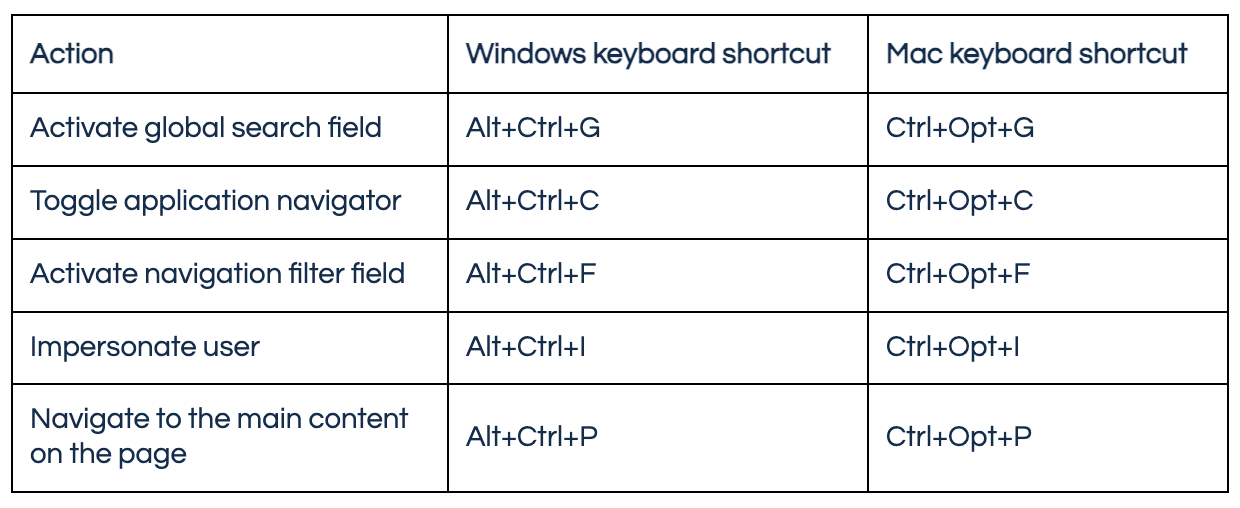
Handy Special Keyboard Shortcuts
Keyboard Shortcuts Properties
- Navigate to All > User Administration > User Preferences.
- Search for the user preference you want to change the key combination for.You can change any of the following options:
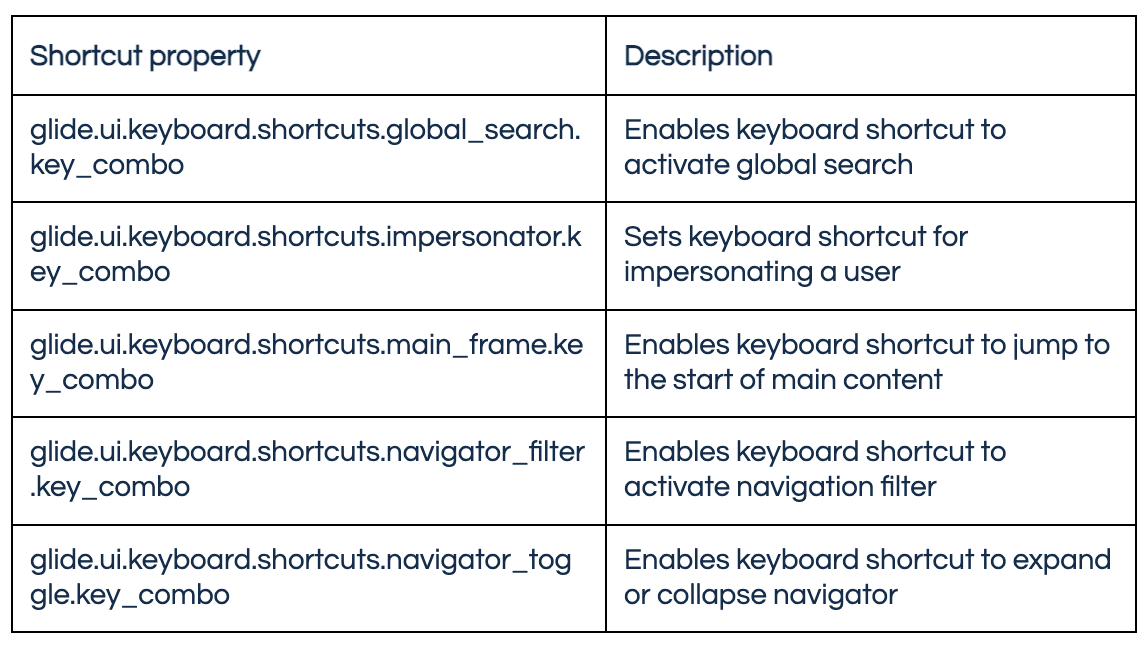
- In the Value field, update the value to one of the following combinations:
- Use two access keys such as Control, Command, Alt, or Option as the initial keys, followed by any of the following keys. For instance, ctrl+alt+p
- 0, 1, 2, 3, 4, 5, 6, 7, 8, 9, a, b, c, d, e, f, g, h, i, j, k, l, m, n, o, p, q, r, s, t, u, v, w, x, y, z, num0, num1, num2, num3, num4, num5, num6, num7, num8, num9, f1, f2, f3, f4, f5, f6, f7, f8, f9, f10, f11, f12, num, semicolon, equal, equalsign, comma, dash, period, slash, forwardslash, graveaccent, openbracket, backslash, closebracket, singlequote, space, spacebar
Using ServiceNow’s special keyboard shortcuts has significantly saved me time and boosted my productivity as a developer. By enabling these shortcuts, I can navigate the platform swiftly, perform frequent actions like saving forms, inserting records, and editing lists with just a few keystrokes. This reduces my reliance on the mouse, streamlining my work and allowing me to focus more on writing and debugging code. These efficiencies have not only made my daily tasks easier but also enhanced the overall quality and speed of my development work.
Looking for more ServiceNow tips? Check out our blog or reach out to our team at chat@rapdev.io