



















.svg)











.svg)





















.png)


More Power
Can't get that Discovery pattern to do what you need to do? Sometimes the OOB no-code UI just isn't enough. Sometimes you need more power. ServiceNow agrees and has a sparsely-documented way to invoke Javascript from within a Discovery pattern step. You can invoke Javascript to return the value for any Value field that appears on a pattern step UI form. At last count, ServiceNow has about 400 such pattern steps that invoke Javascript.
How to do it
Here's a simple example: In a Value field, begin typing EVAL(. Yes, with the open paren. This will cause the pencil icon to suddenly appear to the right of the field. Click the pencil to open the script editor.

This will pop up a window which lets you craft your javascript. Here’s an example.

There’s a couple of things to note:
- Don't do a return statement! The system returns the value of the last var that you populate. Add a return statement, and the script will fail.
- You cannot declare and assign the returned value as the last line. That is to say, line 14 cannot be var answer = getMacAddrFromName(name). This will fail.
Here's an OOB example demonstrating that we can invoke javascript on anyValue field.
It’s Javascript, mostly.
There are a few things to note about Javascript here.
- You can find hundreds of OOB examples to get ideas on what is possible, along with various objects that do many things for you. Query the sa_patterns table where pattern text contains javascript. Filter the list further to look for particular items of interest.
- You can reference variables by enclosing them like ${cmdb_ci_etc_etc}.You can call script includes, so long as they exist on the Mid Server*.***
- OOB examples make heavy use of escaping double quotes. Using single quotes often works without having to clutter the code with escape characters. If you encounter unexpected results, review ServiceNow's examples and how they deal with quotes and strings.
- There are numerous OOB examples instantiating useful Java objects, some of which include: CommandRunner (to run commands on the target host), HttpCallHandler, DNSUtils, ArrayList, and more.
DiscoLog
You can write to the Discovery Log. Then, instantiate the Object and call its debugex function.
var logger=Packages.com.snc.sw.log.DiscoLog.getLogger('Some Identifier Here'); logger.debugex('Test display in log via EVAL script in pattern.');
Your messages show up in the pattern log for that step.
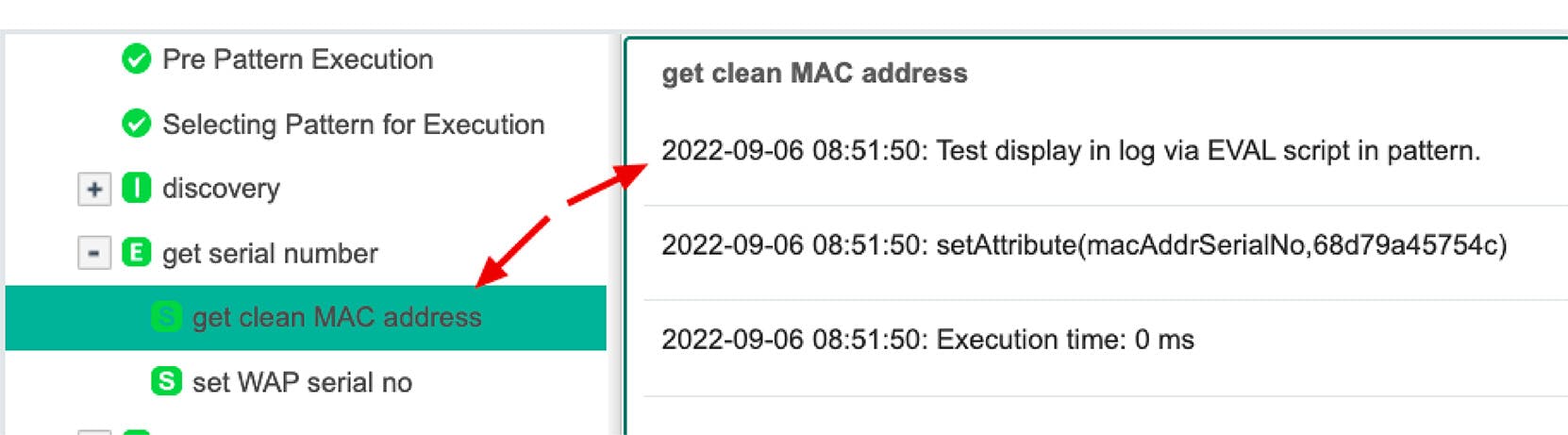
The "Some Identifier here" does not appear to show up anywhere. Also, there is an "error()" function, but it seems to behave exactly like the debugex() function.
CTX
An object called CTX allows you to get/set pattern variables and run shell commands on the target host. See Using Javascript for accessing advanced operations in Pattern Designer for more. Some function examples follow.
- CTX.getAttribute(name): This method uses the attribute name as its input and returns its value. Ex: CTX.setAttribute('sql_instances_labels', sqlLabels);
- CTX.setAttribute(name, Object): This method sets an attribute in the context. The first argument is the attribute name. The second is the value. Ex: var response = CTX.getAttribute('sql_instances_response');
- CTX.getDiscoveryProvider: I'm still trying to figure out what this does, but I saw it in an OOB script.
- ommandManager.shellCommand: This method executes a command on a target host. On UNIX machines or network devices, this command uses SSH. On Windows machines, it runs commands using the 'cmd'. EX: CTX.getCommandManager().shellCommand( "hostname", false, null, null, CTX); Its arguments:Command: string containing the command to be executedsuperUser: Boolean argument defining if the command needs to be executed with elevated rights like sudoexecutionMode: put null herecommandParams: put null hereexecutionContext: put CTX here